14 of 48 in game

Many Roblox accounts, one calm window.

Nocta keeps your accounts and sessions, launches them into a game one after another, and looks after every client while it runs.

Latest: v1.0.0

Free and open source under GPL-3.0. Windows 10 and 11. Unofficial, not affiliated with Roblox Corporation.

10,000
accounts in the list, tested
939 → 350 MB
one client in a game, with the RAM cap
~140 MB
Nocta itself with 241 accounts
8
languages

Measured with release builds on Windows. The RAM figure is one Roblox client in one game; yours depends on the game.

Why Nocta

Built for a lot of accounts

Import thousands of username:password:cookie lines with a preview, sort them into folders and find any account by name, alias, note or field. The interface is dense, calm and fast to scan, and stays that way at 10,000 accounts.

Launch with a plan

Search a game or paste a link, then pick a server yourself or let Nocta choose: room for every account, lowest ping, a hop, one region, or the server a friend is in.

Clients that look after themselves

Anti-AFK before Roblox's 20-minute kick, auto-rejoin after crashes, frozen clients restarted, and a Discord notice when something happens.

Light on your PC

A RAM cap per client, memory trimming, efficiency mode, a CPU limit, a frame-rate cap and windows as small as one pixel.

A Roblox install of its own

Version pinning, update control, a low-graphics mode and FastFlags from Roblox's allowlist. Your regular Roblox install is not changed.

Your data stays here

Passwords, cookies and two-step keys are encrypted with a key in Windows Credential Manager. Nocta talks to Roblox, and to a Discord webhook if you set one.

Runs while you are away

Presets with global shortcuts, schedules that start and stop groups of accounts on chosen days, the tray and the command line.
A look inside

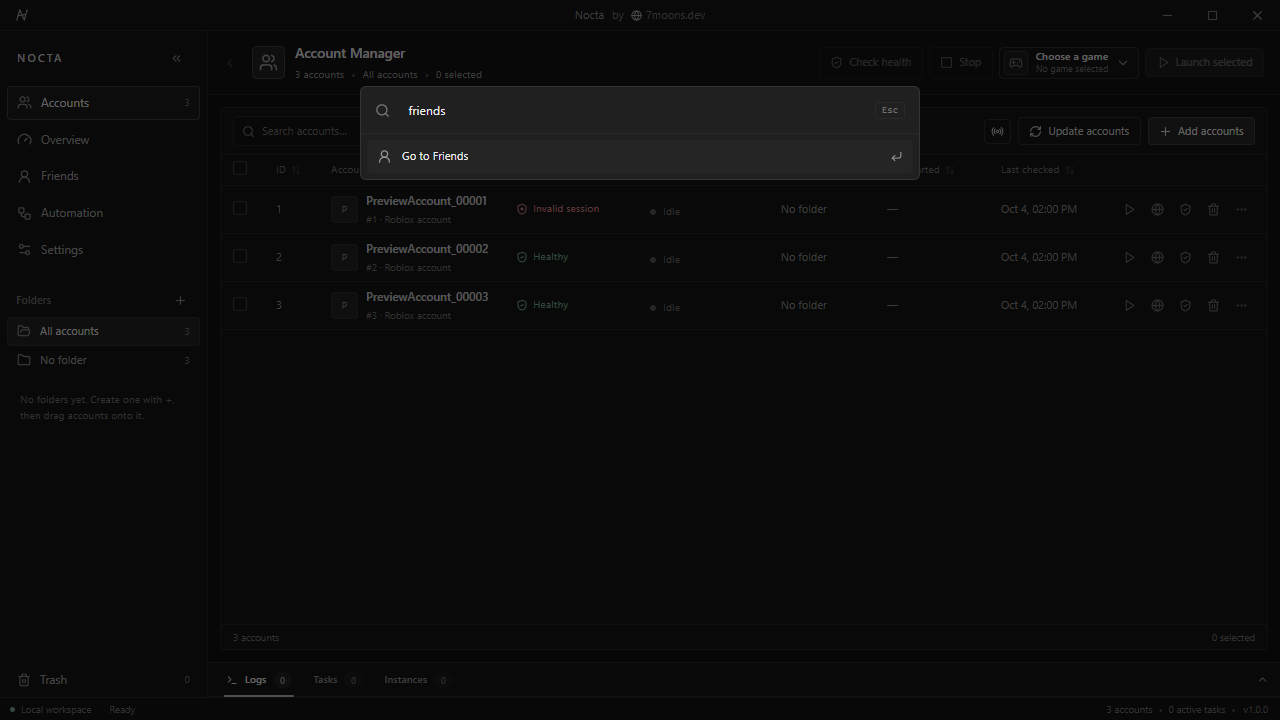
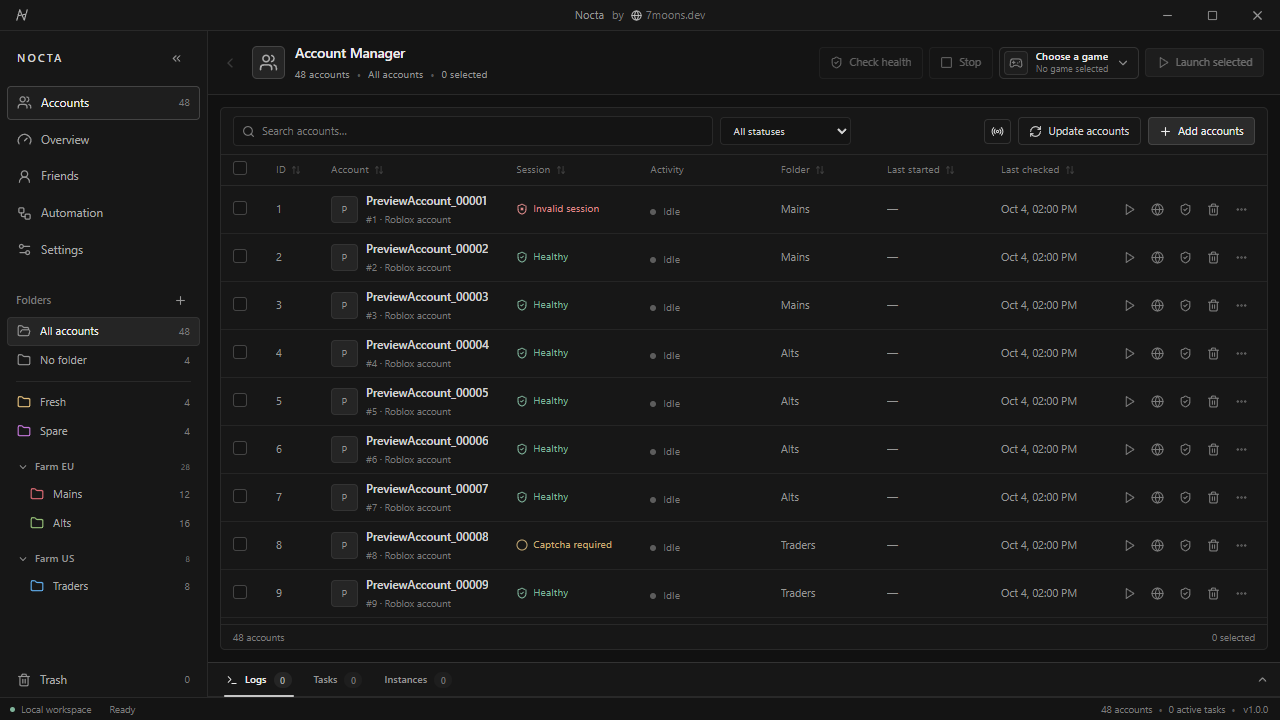
Nocta's Accounts view
Folders and folder groups, session state and activity per account.
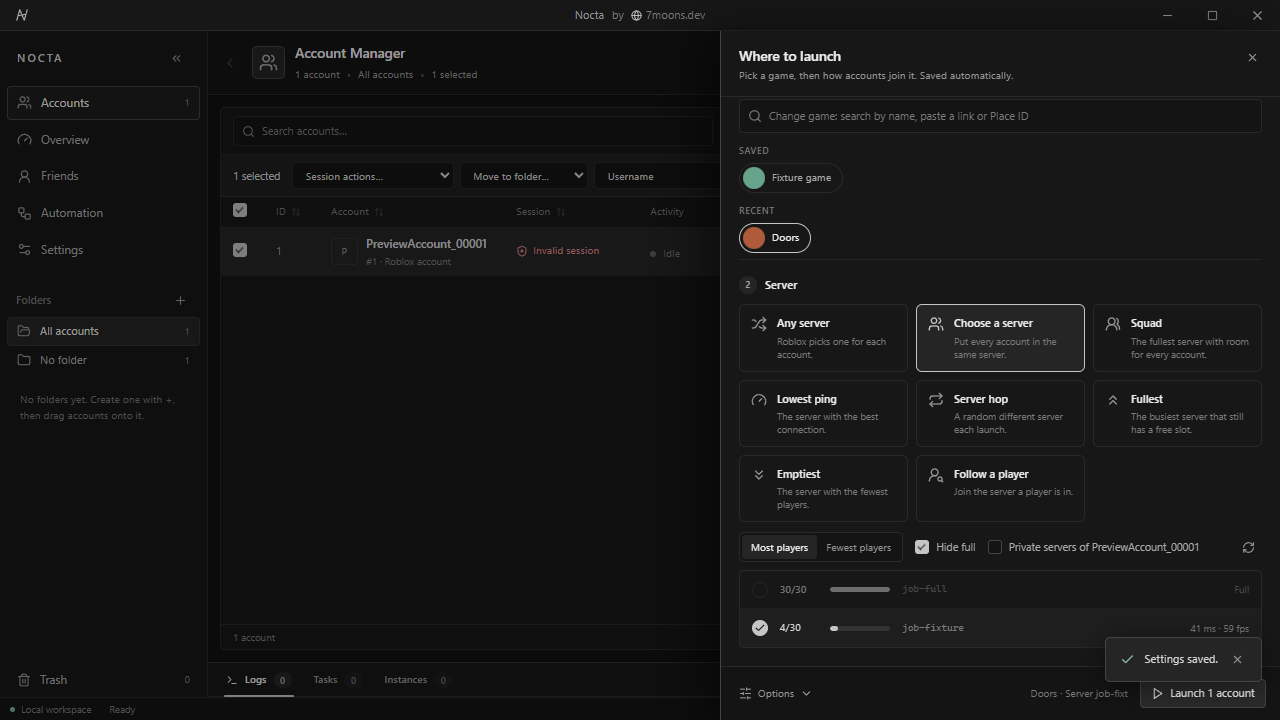
Nocta's Launch panel view
A game, a join strategy and the live server list.
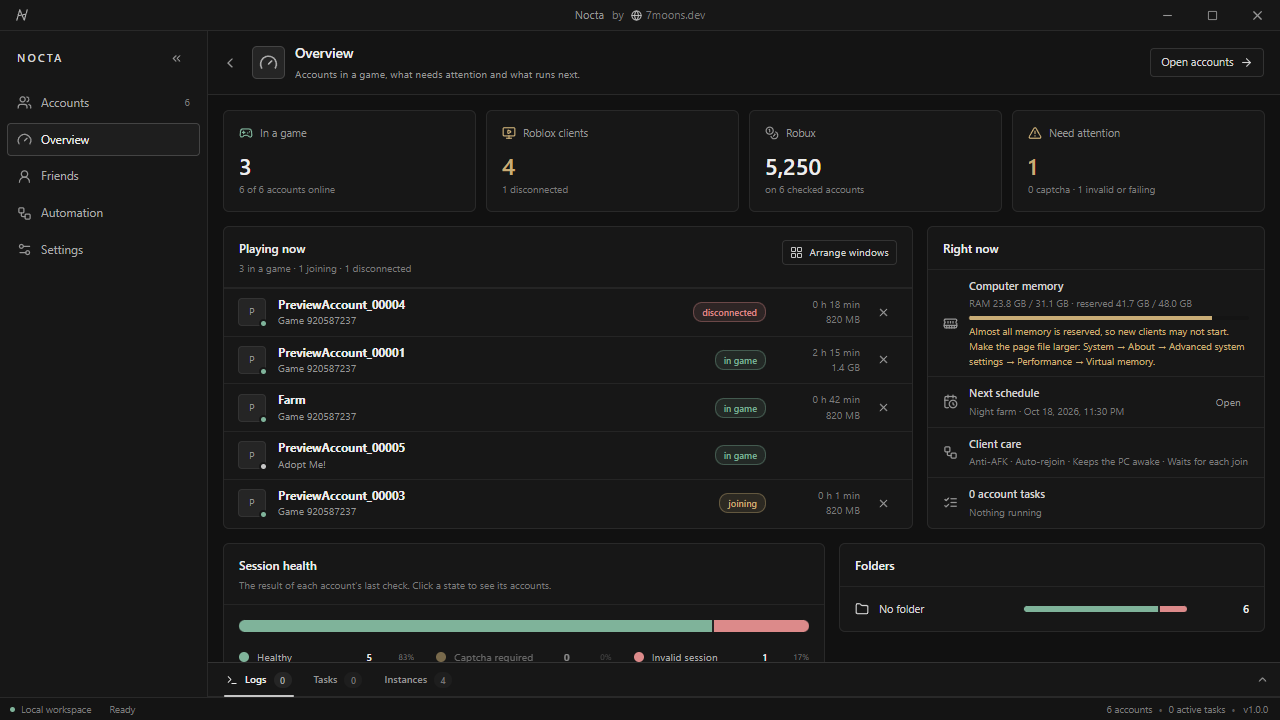
Nocta's Overview view
Accounts in a game, memory, the next schedule and accounts that need attention.
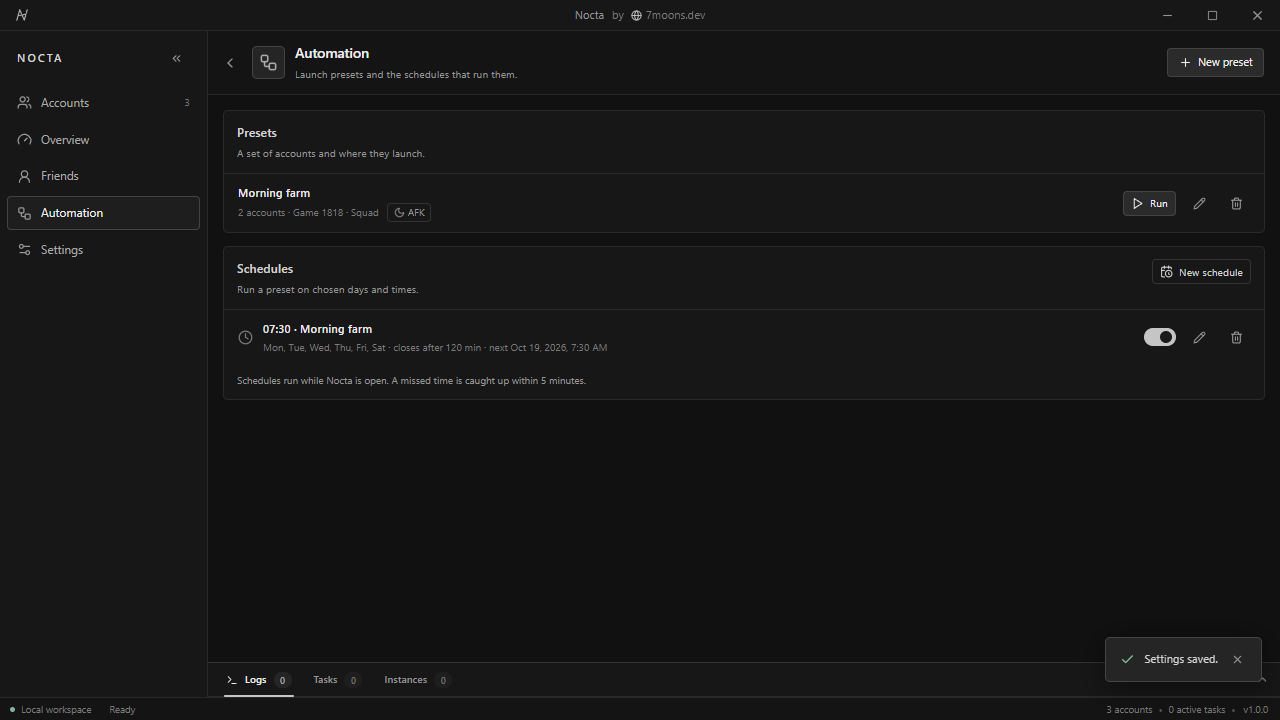
Nocta's Automation view
Presets and the schedules that run them.
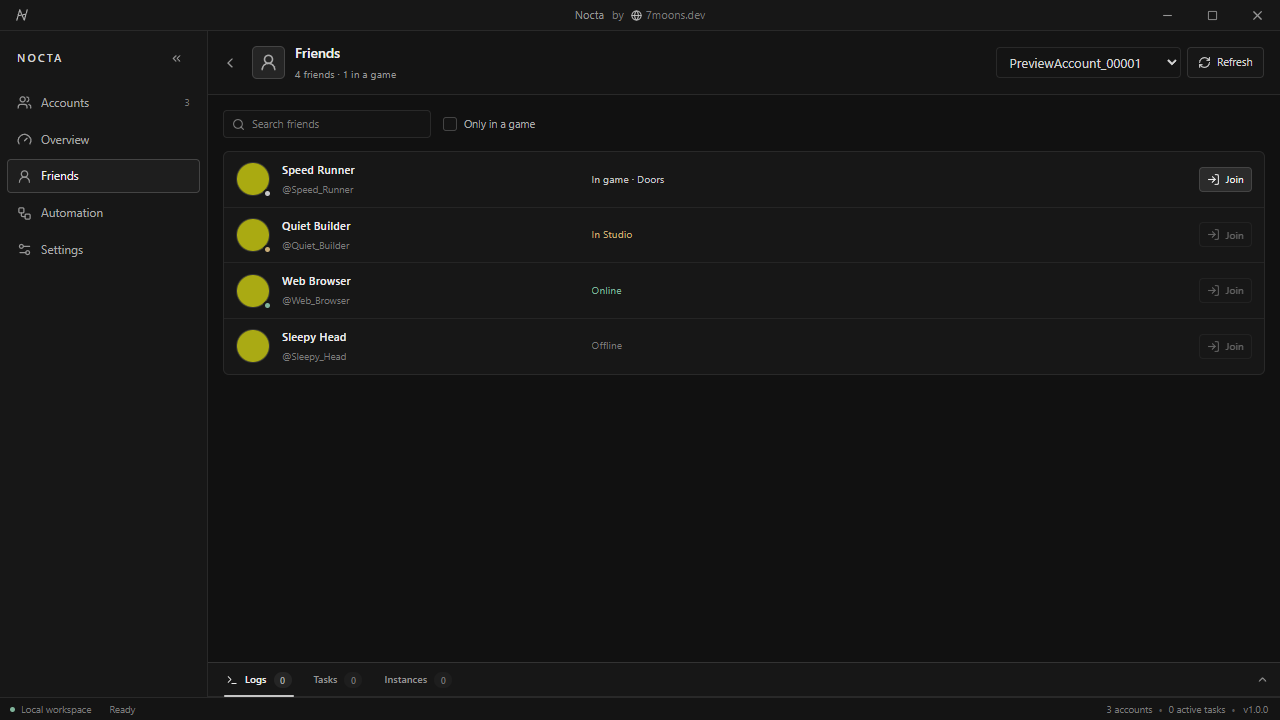
Nocta's Friends view
Where each account's friends are, and joining them.
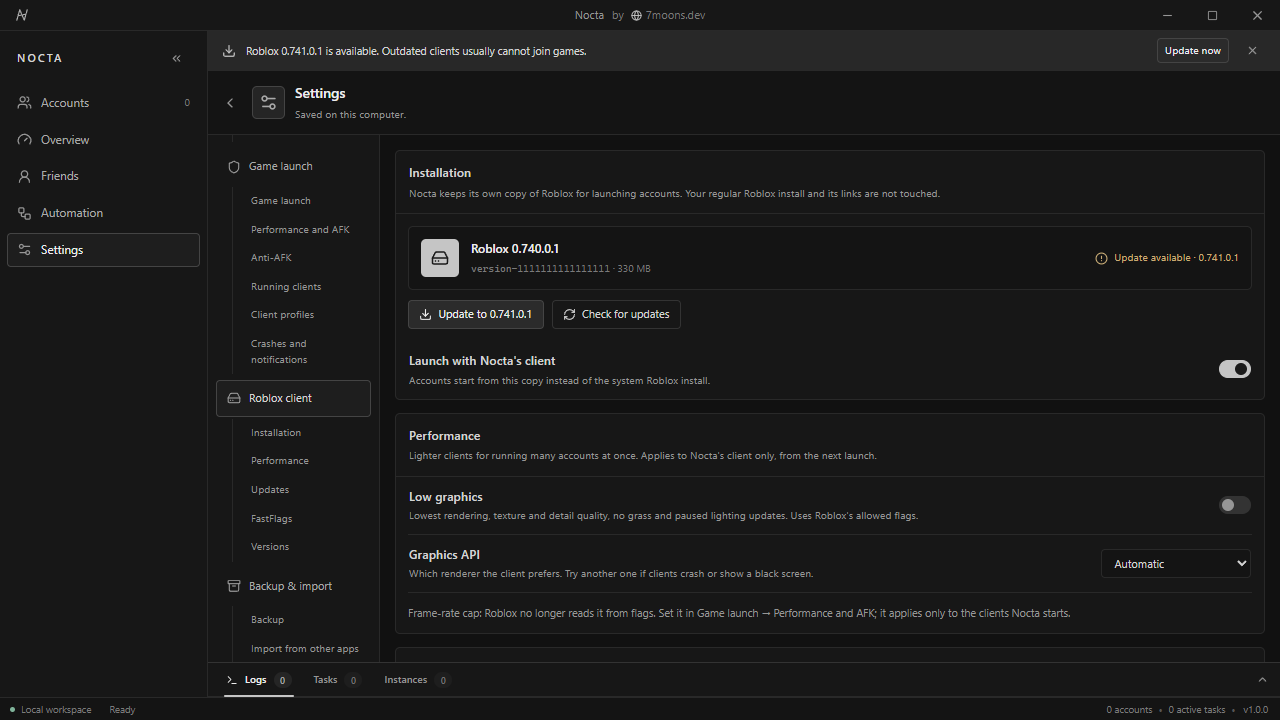
Nocta's Roblox client view
Nocta's own install, updates and performance settings.
Nocta's Command palette view
Ctrl+K: views, presets, accounts and actions by name.

How a launch works

Every account goes through the same steps. The next one starts once the previous client is in its game.

  1. 01TargetA game, a server, a link or a strategy
  2. 02PrecheckCan this account join right now?
  3. 03TicketAuthentication for this one launch
  4. 04StartThe Roblox client, claimed by its process
  5. 05TrackLoading, joining, in game, or why it left
  6. 06UpkeepAnti-AFK, memory, rejoin

Pick a strategy, see where four accounts land

4 accounts on Server 4.

  • Private serverPrivate41 ms, Europe
  • Server 196 ms, North America
  • Server 238 ms, Europe
  • Server 364 ms, North America
  • Server 4120 ms, Asia
  • Server 5alice is here55 ms, Europe

A sample game with twelve players per server. In Nocta the list is live, and you can set a region for any strategy.

From the command line

A place ID or any Roblox link, accounts by username, alias or ID. When Nocta is already open, the running window takes the command.

> nocta --preset "Morning farm"
> nocta --launch 1818 --accounts alice,Main,3

Features

Accounts, 6 features

Import
username:password:cookie lines with a preview, or sign in on Roblox's own page
Folders
Folders and folder groups with any color, drag accounts onto them, reorder them
Details
Your own order, aliases, notes, color tags, pins and named fields that search finds
At a glance
Avatars, online status, Robux, playtime and two-step verification codes
Out
Copy in your own formats (cleared after 30 s), export to CSV or JSON, restore from Trash
Streamer mode
Hides usernames, Roblox IDs and avatars; aliases stay

Sessions, 3 features

Checks
See which sessions still work, validate and refresh cookies, fix stale ones in one click
Browsers
Open any account in its own signed-in browser, titled with its name
Captchas
The account is marked, and its browser is where you clear it

Launching, 5 features

Games
Search by name, or paste a link, share link, private server or place ID
Servers
A server browser, or one of nine strategies, with a region filter
In order
Accounts start one after another, each once the previous one is in its game
Tracking
Loading, joining, in game, or disconnected with Roblox's own reason
Multi-instance
Several Roblox clients side by side

Client upkeep, 7 features

Anti-AFK
A key press or a click in idle clients before the 20-minute kick, waiting while you type
Auto-rejoin
Brings back clients that crashed or were disconnected, with optional Discord notices
Memory
A RAM cap per client, regular trimming and low memory priority
CPU
Priority, efficiency mode (EcoQoS) and a CPU limit, separately for main accounts and the rest
Frame rate
A cap and an AFK profile for the clients Nocta starts
Windows
Named after their account, arranged in a grid across monitors, down to 1×1 pixel
Restarts
Frozen clients rejoin; other accounts can restart on a timer while main accounts keep running

Automation, 3 features

Presets
Accounts, destination and AFK settings under one name, with an optional global shortcut
Schedules
Run presets on chosen days and close what they started later
Command line
nocta --preset and nocta --launch, also into a running Nocta

Account tools, 4 features

Sessions
Sign an account out of every other device; Nocta keeps the new cookie
Profile
Display names and privacy, also one setting on many accounts at once
Quick Login
Approve a code after checking the device
Friends
Make your own accounts friends: everyone with everyone, or with one main account

Interface, 4 features

Command palette
Ctrl+K for views, presets, accounts and actions, plus global shortcuts and a tray icon
Themes
Catppuccin, Dracula, Nord, Gruvbox, Tokyo Night, Rosé Pine, One Dark and more, and a live theme editor
Languages
English, Polish, German, Spanish, French, Portuguese (Brazil), Turkish and Russian
Safe display mode
Restarts without GPU acceleration when a graphics driver leaves the window blank

Moving in

Bring your accounts along. Nocta took over the useful features of Roblox Account Manager and MultiAlt, each one backed by a test.

Roblox Account Manager

Import ic3w0lf's AccountData.json, DPAPI and password-protected files included, with aliases, notes and groups.

The previous Nocta app

Import its accounts and folders from its database. The file is only read.

A list of lines

username:password:cookie, one per line, with a preview and a duplicate check against every account, Trash included.

Left out on purpose

Changing machine IDs, MAC addresses or the registry is ban evasion, and Nocta does not create Roblox accounts.

Feature parity and its tests ↗

Download

Windows 10 and 11, 64-bit. An installer, or a portable folder you can keep anywhere.

v1.0.0, released 2026-11-11Release notes ↗SHA-256 checksums

After downloading

Installer

  1. Open the setup file from your Downloads folder.
  2. If Windows says it protected your PC, click More info, then Run anyway. Builds are not code-signed yet.
  3. Nocta installs for your user only and opens on an empty workspace. Import your accounts, or restore a Nocta backup.

Portable

  1. Unzip the folder somewhere you own, such as Documents or a USB drive, not Program Files.
  2. Run Nocta.exe. The portable.flag file next to it keeps the data folder beside the program.
  3. The encryption key stays in this PC's Credential Manager. To move to another computer, use a password-protected backup.

Updating is manual for now: quit Nocta, then install the new version over the old one, or replace Nocta.exe and runtime in the portable folder. Your data stays, and the database updates itself.

Changelog ↗All releases ↗

Build it yourself

$ gh repo clone 7moons/nocta
$ cd nocta && bun install --frozen-lockfile
$ bun run desktop

Build requirements ↗Architecture ↗

Security

Found a vulnerability? Report it privately, not in a public issue.

Secrets are sealed
Passwords, cookies and two-step keys are encrypted with AES-256-GCM before they reach the database, with a fresh nonce per value.
The key lives apart
A random key per installation, kept in Windows Credential Manager, never next to the database. Copying the data folder does not copy the key.
The interface sees no secrets
The window gets metadata only. Copying to the clipboard and backups are the only ways a secret leaves the store.
Cookies go to Roblox only
Sent only to HTTPS roblox.com hosts; every redirect is checked again, responses are limited in size and time, errors are sanitized.
Backups
Encrypted with a key derived from your password (Argon2id). Restoring needs an empty workspace and happens in one transaction.
Your own browser is untouched
Sign-ins use a bundled Chromium with fresh profiles in Nocta's data folder, never your Chrome profile.

Limits

Windows only
Launching, multi-instance, window control and Credential Manager are Windows parts. There is no Linux or macOS build.
Roblox's rules apply
Automating accounts can break Roblox's Terms of Use. You are responsible for how you use Nocta.
Captchas need you
Nocta marks the account and opens its browser; it does not solve captchas.
Updates are manual
There is no built-in updater yet, and the builds are not code-signed, so SmartScreen warns on first run.
The frame-rate cap is Nocta's
It reaches only the clients Nocta starts. Roblox you open yourself keeps your own setting.
One PC, one key
Copying the data folder to another computer is not enough. Move with a backup.

Questions

Is Nocta free?

Yes. It is free and open source under GPL-3.0, with no account of its own and no paid tier. Source on GitHub ↗

Can my accounts get banned?

Nocta launches the real Roblox client through Roblox's own web APIs and leaves out ban evasion such as spoofing machine IDs. Automating accounts can still break Roblox's Terms of Use, so how you use it is up to you.

Where are my accounts stored?

In %APPDATA%\app.nocta.desktop, or next to Nocta.exe in the portable package. Secrets are encrypted, and the key is in Windows Credential Manager.

What goes online?

Roblox: its web APIs, game search and its client downloads. And a Discord webhook, if you set one. Nothing else.

Does it change my Roblox install?

No. Nocta keeps its own Roblox copy in its data folder and never changes the system's roblox-player handler or your own Roblox settings.

How many clients can I run at once?

As many as your PC holds. The account list is tested with 10,000 accounts; with the RAM cap one client in a game took 350 MB instead of 939 MB.

Can I bring my accounts from Roblox Account Manager?

Yes. Settings, Backup and import reads AccountData.json, password-protected files included, with aliases, notes and groups. Feature parity ↗

How do I update?

Quit Nocta and install the new version over the old one. Your data folder stays and its database updates itself. Every change is in the changelog. Changelog ↗

Something broke. Where do I report it?

Open an issue with what you did and the lines from the activity log around it. Security problems go to a private advisory instead. Open an issue ↗